
Over the past year I have been building and maintaining three different coffee map mobile apps: MN Coffee, NYC Coffee and Chicago Coffee. Each app lists the coffee shops in the location on a map and shows which shop is closest to the user. This helps them/me find the closest coffee shop no matter where I am in any of those locations. The app then allows users to click into a location to see the Google AI overview as well as some other highlights about the coffee shop. In the end, helping them make a decision if they want to go to the coffee shop or not.
Each map started out as separate projects because, well, I built them at different times and was too lazy to figure out a way to build them all into a single codebase from the start. But that meant every new feature required me to push the update to three different codebases. That got old really fast. So, last week I decided to jump into a vibe coding session to have Claude merge the three codebases together. But before I go into that, here's the UI change that I made that pushed me to create a single codebase and ditch the three repository structure.
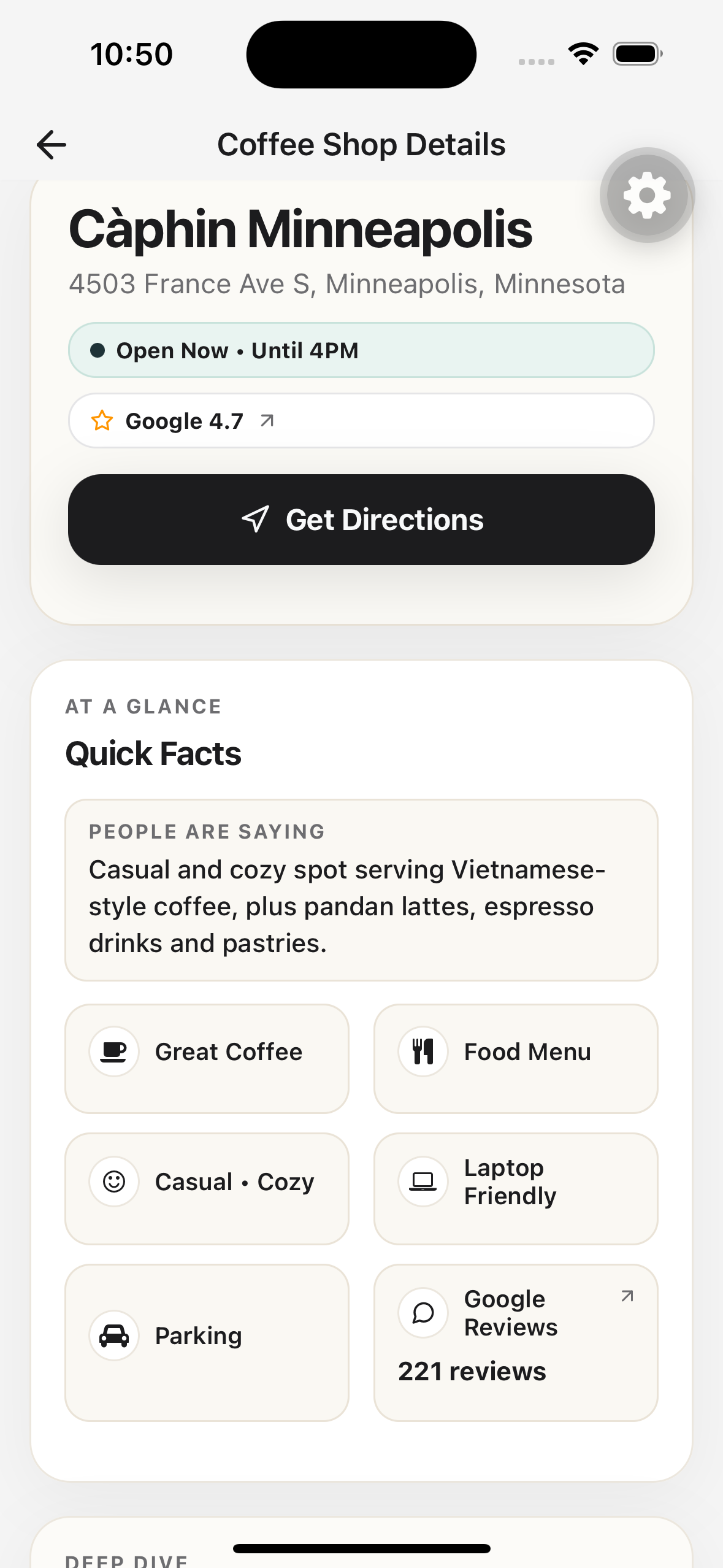
I updated the MN Coffee Map details screen to a new version that's better looking and easier for users to get information right up front. On the top of the page immediately the user sees the name, address, open status, Google rating and a link to get directions. That seems to be the most important information for me when I'm using the app.
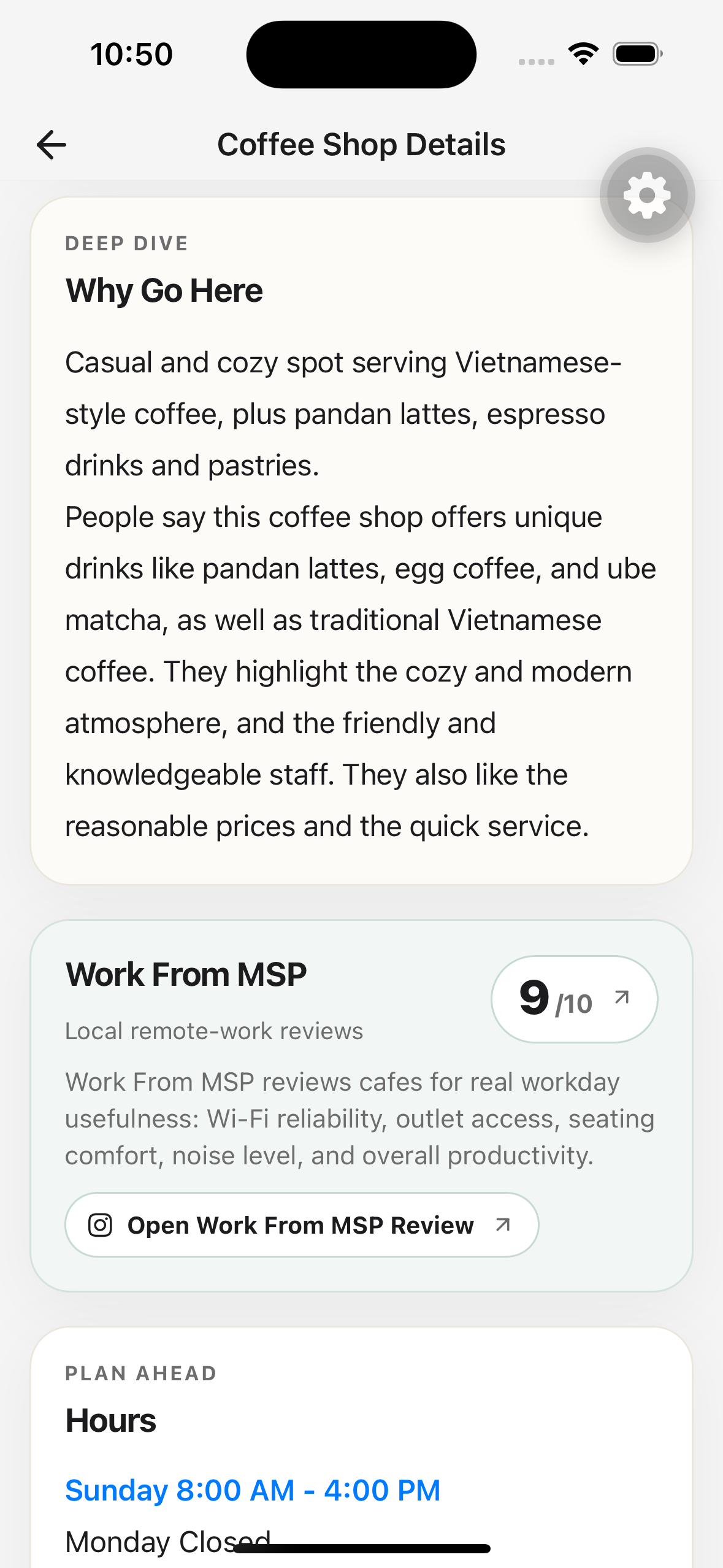
The next section is a section of quick facts about the coffee shop that contains Google AI's summary as well as some of the highlights that are returned from the Outscraper process. These highlights are if there is "Great Coffee", a food menu, if it's laptop friendly and what the vibe is like. Then I added a new feature that is only present for the Minnesota version of the app - that's a link to the Work From MSP Instagram Reel for the specific coffee shop (if one exists). Work From MSP is a popular Twin Cities Instagram account that reviews coffee shops specifically for remote work - perfect for my app's audience. In their Reel, Work From MSP breaks down the coffee shop's vibe and different aspects of the coffee shop. For example, if it's a good place to work at, how is the wifi and if there are ample available outlets. This is a great addition to the details page because it brings in a visual and social aspect of the coffee shop that the current app doesn't have.
While I was making the details page update I realized that I was going to have to make the same updates to the NYC Coffee Map and Chicago Coffee Map. I've already merged the database and API layers together into a single repository so I decided to try to merge the app layers together. These three projects are built in Expo in React Native and built using EAS. Inside an Expo app you have the ability to configure EAS dynamically. This allows you to have a single source application that can have different config settings for the important build parts that need to be uploaded to EAS. So for each app, I push the necessary configuration up to EAS and produce the correct build.
I was able to use Claude to do 99% of the work while directing the agent to build the solution in a way that works for me while preserving the details of each individual application. I started a planning session with Claude to lay out the idea of having three applications together that shared the same codebase. Each application would need to keep their own Expo Product URL, namespace and icons. I used the NYC Coffee Map codebase as the main codebase to launch from. Claude was able to analyze the three separate codebases and merge them all into a single codebase (!!!). It was incredible to watch, actually. There wasn't very much input that it needed from me other than setting some guard rails - like each app keeping its own bundle identifier, app icons, and color schemes. The agent was able to take my parameters and build out a single codebase for all three Expo applications.
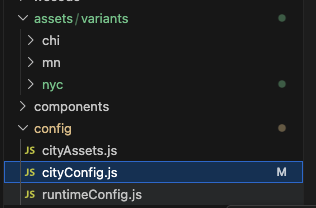
I've yet to publish the new code to the app stores but locally I'm able to run the Chicago, NYC and Minnesota coffee apps from the same codebase. The builds are config based now. For example, to run the MN Coffee Map I just need to execute npm run build:mn (or :nyc or :chicago) and it compiles the right app. Claude came up with the structure for three assets folders and a cityConfig.js file that holds the configuration information for each of the applications. So name, product url, slug - each distinct config setting or text is now held in this config js file that is compiled at build time into the application.
// cityConfig.js
export const cityConfigs = {
  mn: {
    name: "MN Coffee Map",
    slug: "mn-coffee",
    productUrl: "mncoffeemap.com",
    primaryColor: "#4A90E2"
  },
  nyc: { /* ... */ },
  chicago: { /* ... */ }
};
Next up is publishing all three apps to the iOS and Android app stores with this new unified codebase. The real win here is that any new feature I build - like that Work From MSP integration - can now be conditionally rolled out to all three cities from a single place. If you're maintaining multiple similar apps, I highly recommend this approach. Let Claude handle the tedious merging work while you focus on the architecture decisions.