
Just show me the code: View the entire project in Github
My t-shirt company, Big Little Cities, has over 80 cities in our catalog. When we release a new product type (t-shirt, sweatshirt, etc) I have to manually create each product listing in Printify one by one. That's a lot of clicking around. This process is tedious and takes a lot of time.
Printify has a pretty good API that allows developers to create and manage their products. The current process for creating a new product involves creating a product, manually uploading the artwork, selecting the artwork per variant (color/size combination) and then publishing the product. I decided that I would write a Python app to programmatically create new Printify products, create the variants for each product, upload the associated artwork for each variant and finally assign each variant artwork to the correct product.
This blog post is about how I utilize the Printify API to get a list of available products and their IDs from Printify (Printify calls these Blueprint IDs - essentially product templates) and then how to use those IDs to create products via the Printify API. What used to take me a couple of days now takes an hour or two.
The Core Components
Overall Structure
I set up a folder structure that lists all of the cities by their name along with each of the designs as children. For each of our products we have different t-shirt color options (variants). Each variant uses a different design color chosen to match the t-shirt color. The design file is named as a template that the application can easily parse. The naming convention is City_DesignColor_Font_Weight.png. Pretty simple stuff but smart enough that the program will know exactly what to do with it when it's time to parse out the design files.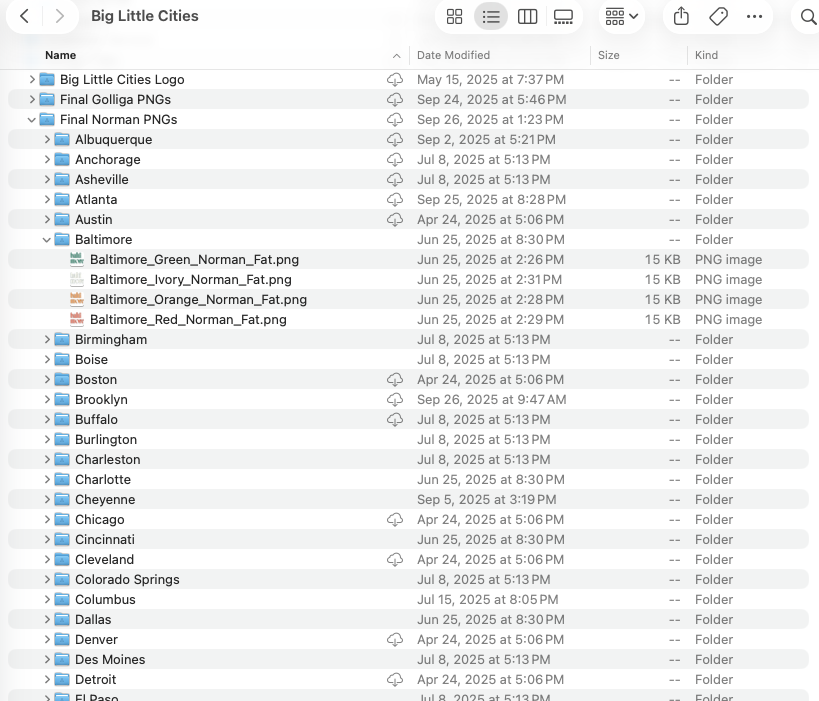
The app opens the parent folder and loops through each city name. For each city name/city folder new products are created for each design inside the city folder. That means the system scans the folder directory containing the design files, extracts metadata from filenames, uploads the design files as images to Printify's media library, and creates products with variant-specific configurations. Our products are in a specific format, like Chicago 01 T-Shirt. Using the pattern of {{City}} 01 T-Shirt, the application can easily scan a subfolder of city names, create the product for each folder name/city and upload the associated artwork.
By doing it this way, I don't need to keep an ongoing list in a CSV file or manually enter each product at the command prompt. Adding a new city to the shop just requires placing the named design files in the city folder executing the batch upload. The folder, product type and variants are all controlled via a product_config.json file at the root of the project.
Single configuration file
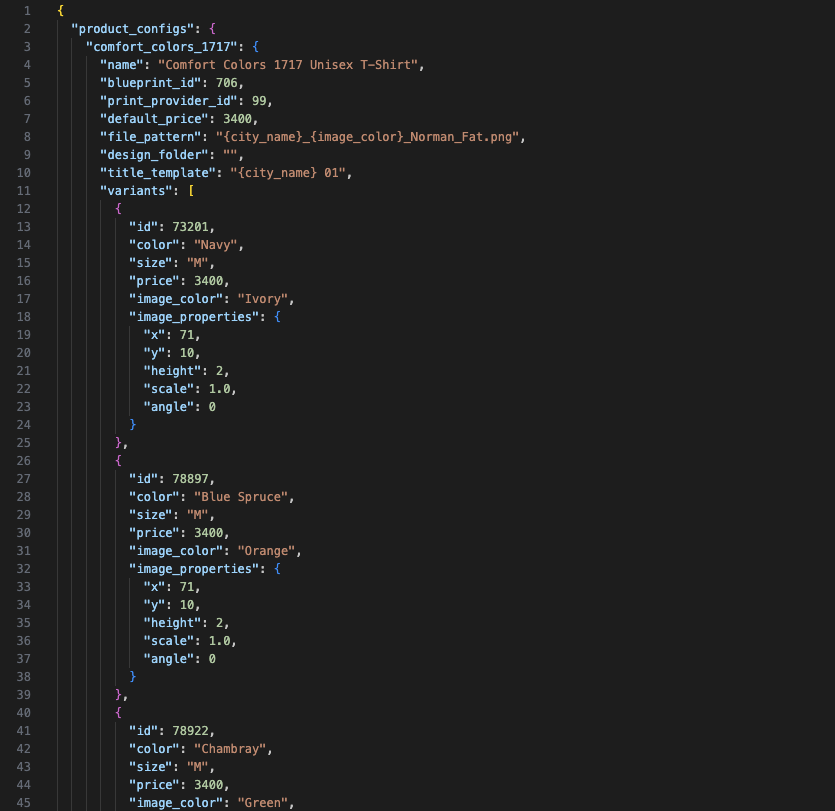
It's all run via a product configuration file calledproduct_config.json, which maintains the product blueprint IDs, print provider, variant configurations, pricing structures and image positioning parameters. The positioning parameters don't work as intended yet - I still have to manually adjust positioning after upload.
Each variant entry includes:
- Printify variant ID (color/size combination)
- Price in cents
- Associated image color identifier
- Positioning properties (x, y, height, scale, angle)
API credentials are separated from configuration files and stored in environment variables via a .env file, this ensures the secure handling of authentication tokens and allows for easy public hosting on Github.
Blueprint Discovery Utility
Before you can publish a new product, you need to have what Printify calls a Blueprint ID. The get_blueprint_info.py tool lists all the different Blueprint IDs that are available in Printify. I created this module because Printify's documentation doesn't make it easy to find valid variant IDs for specific product types. Printify's web interface doesn't expose these identifiers, which are required for programmatic product creation. This utility queries the Printify API catalog, displays available blueprints and print providers, and enumerates all variant IDs with their corresponding color and size attributes.
Where Printify Falls Short
Lack of Bulk Operations
Printify's web interface does not provide bulk product creation or bulk image upload. Printify does have a image gallery, however there is no way to upload multiple images at a time to this gallery. Each image uploaded to the gallery is done one by one from their design studio. Even if you are not programatically creating new products, having the ability to bulk upload your design files to Printify saves a huge chunk of time.Creating a new product requires a bunch of extra clicks, having the bulk uploader just run through and create products is great.